

Skip to content

Shopify CRO for home and kitchen brands

Make choosing the easy part.

Shopify conversion rate optimization for cookware, cutlery and home goods brands. Colin finds where customers get stuck comparing sizes, materials or sets, then builds the fix and measures what changed.

For Shopify and Shopify Plus brands doing $500k+ a year online, or about 10,000+ visits a month.

Colin Stuckenschneider, Shopify engineer.
15 years of engineering, 9 on Shopify.

Colin built Cangshan Cutlery’s storefront: 56.1% higher purchase conversion after launch
CRO Audit. Fixed price, findings in 10–15 business days.
$2,899
CRO Audit. Fixed price, findings in 10–15 business days.
From $2,500 each. Fixes built and measured, with the price in writing first.
2-week sprints
From $2,500 each. Fixes built and measured, with the price in writing first.
Your team or agency can build the plan. Pause or stop any time.
No lock-in
Your team or agency can build the plan. Pause or stop any time.

Sound familiar?

Customers like the product. They can’t pick one.

  • “Customers email us to ask which size fits their kitchen.”
  • “We sell three product lines, and nobody can tell them apart online.”
  • “Our best sellers get the same questions about materials and care, over and over.”
  • “On phones, the details customers need are buried below the reviews.”

Results - What happened at Cangshan Cutlery.

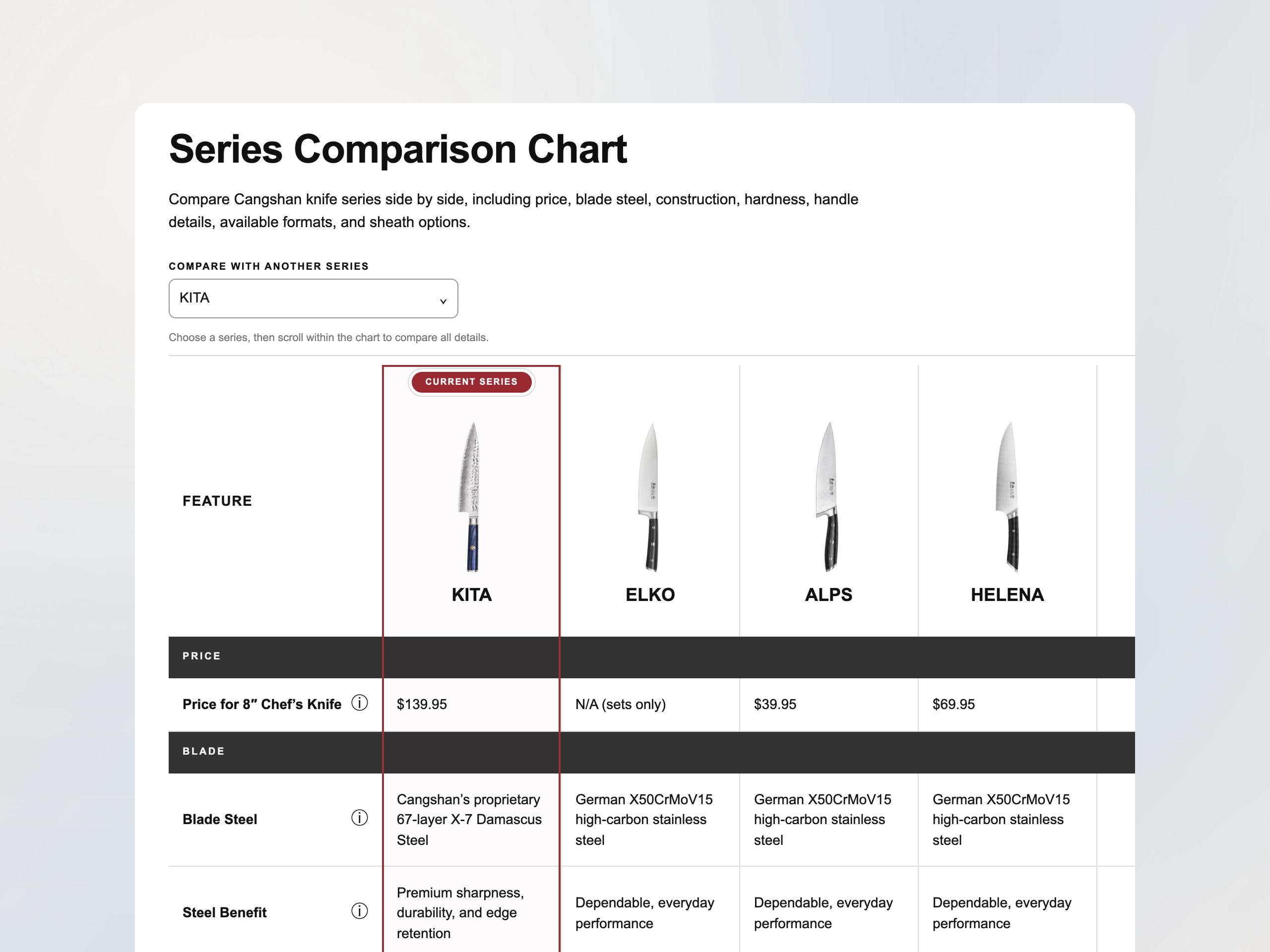
Cangshan sells knife block sets, individual knives and accessories across several series. We put steel, construction and set contents next to the buy button, added a chart that compares every series, and rebuilt filters and search around how customers shop.

The 28 days after the August 2026 launch, compared with the 28 days before.

Purchase conversion
+56.1%
Purchase conversion
Net sales
+33.7%
Net sales
Online Store orders
+21%
Online Store orders
Cangshan series comparison chart showing knife prices, blade steel and benefits side by side.

Read the Cangshan case study 

Why it happens - Big catalogs need clear choices.

Customers want to know if a knife block fits under a cabinet, which pans come in a cookware set or how to care for a particular finish. If those details sit in long descriptions or on separate pages, it takes more work to choose.

The fix usually starts behind the page. Organize the product details once, in Shopify, and your filters, comparison charts and product pages can all show the differences right where customers decide.

Answer it on the product page
Size, material, care and what’s in the box, next to the buy button.
Compare in one place
Charts for series, sets and sizes that customers can scan without opening every product.
Filter the way people shop
Size, material, color and piece count, built on Shopify’s own filters.
Measure every change
Compared with your starting numbers, with a plain note on what the data can and can’t prove.

What we work on

Where home and kitchen stores lose the sale.

  • Product pages. Put dimensions, materials, care instructions and set contents near the variant picker and buy button, starting with mobile.
  • Comparisons. Side-by-side charts for series, sets and sizes, so customers can narrow their choice without opening every product.
  • Collections, filters and search. Filters for size, material, color and piece count, plus search that understands product names and common misspellings.
  • Product details in Shopify. Sizes, materials and set contents stored once, so filters, charts and product pages all stay in sync. Your team updates them in Shopify.
  • Speed and tracking. The apps and scripts slowing your pages on phones, and the tracking you need before you trust the results.

Not included. Full redesigns, moving to a new theme, paid ads, email and SMS campaigns, and product photography.

What you get

Changes you can see and measure.

Your starting numbers
Conversion, add-to-cart rate and speed by device and page type, so every change has a number to beat.
A ranked list of fixes
Scored by impact, effort and risk, so the work starts with the fix most likely to matter.
Changes built on a copy of your theme
Customers see nothing until you’ve previewed and approved it.
Sections your team can edit
New comparison charts and product sections work in Shopify’s theme editor, without a developer.
A plain results note
What moved, what didn’t and what the data can and can’t prove.

Sample finding

What one finding looks like.

This sample uses a fictional cookware store and invented numbers to show the format of an audit finding.

Illustrative example

Finding
Customers can’t tell the cookware sets apart on phones.
Where
Cookware set product pages on mobile, between viewing a set and adding it to the cart.
Evidence
Mobile add-to-cart rate on sets is 3.2%, against 6.1% on desktop for the same products. Set contents and pan sizes sit in a tab below the reviews. Customer service gets about 40 emails a month asking what’s included.
Fix
Store set contents and sizes as product details in Shopify, show a “What’s in the set” list next to the buy button and add a compare-sets chart to the collection.
Show the full finding
Cause
Set contents and sizes are typed into each description, so the theme can’t list them near the buy button or compare sets.
Score
Impact: high. Effort: medium, about three days of theme and data work. Risk: low.
How you’ll know it worked
Compare mobile add-to-cart rate on sets, and the number of “what’s included” emails, with today’s numbers for 2 to 4 weeks after the change.

See a full sample audit 

Want findings like this for your store?

Book a free 20-minute call

How it works

Start with a call. Then pick your path.

  1. Fit call (20 minutes, free)

    Tell us about your catalog, your traffic and the questions customers ask most. If we’re not the right next step, we’ll tell you.

  2. Not sure what to fix? Start with the audit

    $2,899, fixed. In 10–15 business days you get findings and a ranked 30–90 day plan any Shopify developer can build. The audit changes nothing customers see.

  3. Already have a list? Start with a sprint

    For brands doing $1M+ a year online. Sprints start at $2,500. You get a written plan and a fixed price before any work starts, and Colin builds on a copy of your live theme.

  4. Launch and measure

    We test on mobile and desktop, publish when you approve and compare results with your starting numbers.

  5. Decide what’s next

    Run another sprint, hand the plan to your team or agency, or stop. No lock-in.

Pricing - Clear prices. No lock-in.

Shopify CRO Audit

$2,899

Fixed.

Pay 50% to book and 50% when the findings and plan are delivered.

  • Findings tied to your real pages and data
  • A check of product pages, comparisons, filters, search and speed
  • A ranked 30–90 day plan any developer can build

Most audits start within two weeks of booking.

Book a sprint within 30 days of your audit and we take $500 off it.

Other ways to start

Ongoing CRO sprints

For brands doing $1M+ a year online that already know what to fix. 2-week sprints from $2,500, with the price in writing before work starts.

See ongoing Shopify CRO 

Monthly plans from $1,950

After your first sprint, book 20 hours a month for $1,950. It’s built for brands doing $1M to $2M a year online. 40 and 60-hour plans are on the pricing page.

Compare monthly plans 

Who builds the fixes

Your developer, your agency or Configurate. If an agency introduced us, they can build the plan too.

Is this for you?

Who this is for.

A good fit if you

  • Sell home, kitchen or similar products on Shopify or Shopify Plus.
  • Do $500k+ a year online, or about 10,000+ visits a month. For ongoing sprints, $1M+.
  • Have products that come in sizes, materials, sets or series.
  • Want changes measured, not just shipped.

Not a fit if you

  • Haven’t launched yet, or have very little traffic.
  • Want a full redesign before you know what’s broken.
  • Need a guaranteed sales increase up front.
  • Aren’t on Shopify.

Questions

Straight answers for home and kitchen brands.

Do you only work with home and kitchen brands?

No. We work with established Shopify brands in many categories. Home and kitchen stores share a problem we know well: customers need help choosing between sizes, materials, sets and series.

What did you change for Cangshan?

We built Cangshan Cutlery’s Shopify storefront. Product pages show steel, construction and set contents next to the buy button, one chart compares every series, and filters and search match how customers shop. Purchase conversion was 56.1% higher in the 28 days after launch than in the 28 days before.

Read the Cangshan case study 

Should we start with the audit or a sprint?

Start with the audit if you’re not sure what’s wrong. It’s $2,899 and takes 10–15 business days. Start with a sprint if you already have a list of fixes, or an audit from someone else. Sprints are for brands doing $1M+ a year online.

How much does ongoing CRO cost?

2-week sprints start at $2,500. Your exact price depends on the fixes you need, your theme, your apps and the size of your catalog, and you get it in writing before work starts. After your first sprint, monthly plans start at $1,950 for 20 hours.

Our agency introduced us. Do we have to switch?

No. Keep your agency. We find what to fix, then build it or hand a clear plan to your agency to build.

Can you guarantee a conversion rate increase?

No. We can’t promise a number before we’ve seen your data. We measure where you start, give you a clear plan and report plainly on what each change did.

Do we need Shopify Plus?

No. We work with every Shopify plan. Shopify Plus lets you customize more of checkout.

Can you improve our existing Shopify theme?

Yes. Colin can build product page, comparison chart and filter improvements on a copy of your current theme. Your team reviews the changes before they go live.

What access do you need, and how do you handle our data?

We need collaborator access to Shopify and read access to your analytics. We use it only for the work, and no store or customer data goes into AI tools without your permission. You can remove access at any time.

Related guides

Shopify conversion audit checklist: 12 checks

A Shopify conversion audit checklist you can run yourself: 12 checks across tracking, speed, product pages, cart and checkout, in the order that matters.

Read the guide

Shopify traffic but no sales? What to check first

Getting Shopify traffic but few sales? Here’s what to check, in order: your numbers, your traffic, product pages, cart, checkout and mobile.

Read the guide

Next step - Help more customers choose and buy.

Start with a free 20-minute call. Tell us about your catalog, and we’ll tell you where we’d start.

Prefer email? Write to hello@configurate.com.