
Ongoing Shopify CRO - Shopify conversion rate optimization, built and measured.
Ongoing conversion work for established Shopify and Shopify Plus brands. Each sprint finds what’s stopping shoppers, builds the fix in your theme and measures whether it worked. Colin Stuckenschneider does the work himself.
- Engineering experience, on every sprint
- 15 years
- Engineering experience, on every sprint
- For each scoped sprint, quoted after a free call
- Fixed price
- For each scoped sprint, quoted after a free call
- Continue, pause or stop after any sprint
- No lock-in
- Continue, pause or stop after any sprint
Sound familiar? - You keep changing the store. Nobody can say what worked.
- “We redesigned the product page and sales didn’t move.”
- “Shopify, GA4 and Meta all show a different number for last week.”
- “We have a backlog of CRO ideas and no agreed first move.”
- “Every new app promises more sales, and the site keeps getting slower on mobile.”
- “Our agency ships what we ask for, but nobody checks whether it sold more.”
- “We added a feature for BFCM and never found out if it helped.”
Why it stalls - Better Shopify CRO starts below the page.
Most Shopify CRO work stops at layouts and button colors. But many conversion problems live underneath: app scripts that slow the product page, tracking that double-counts or misses purchases, theme code that fights the theme editor, and product data that doesn’t help shoppers choose.
We work from evidence first. Before we change anything, we set a baseline and check that the numbers are worth trusting. Then the same engineer who found the problem builds the fix, so nothing gets lost between a strategist’s slide and a developer’s ticket.
- Evidence before opinions
- We don’t run tests on numbers nobody trusts.
- Fix first
- Redesign later, if the evidence calls for it.
What’s included - Five workstreams, one engineer.
Each sprint draws from these workstreams, in the order your data says matters most.
- Measurement you can trust. We reconcile Shopify Analytics with GA4, check customer events, pixels and consent, and fix what’s broken. Every later decision depends on this.
- The buying decision. Product pages, collections, filters, cart and mobile journeys, improved so shoppers can compare, choose and commit. Built as sections your team can edit in the theme editor.
- Speed and code underneath. We find the app scripts, theme code and image loading that slow your highest-value templates on phones, and fix the causes.
- Product data. Metafields, variant structure and product content that power filters, comparisons and clearer product pages.
- Checkout and cart logic. Cart and checkout improvements within what your plan allows. On Shopify Plus, that can include checkout extensibility and Shopify Functions in a custom app.
Not included. Full redesigns, theme migrations, paid ads, email and SMS campaigns, and copywriting outside the pages we’re improving.
What you get - Shipped fixes, and proof of what each one did.
- A baseline before work starts. so every change is judged against your own numbers, not an industry average.
- A ranked backlog. scored by impact, effort and risk, so each sprint starts with the fix most likely to matter.
- Changes built on a copy of your live theme. so nothing reaches shoppers until you’ve previewed and approved it.
- QA on mobile and desktop, plus a tracking check after launch. so a fix doesn’t quietly break measurement.
- A results note after each sprint. so you know what moved, what didn’t, and what the data can and can’t show.
- Documentation for new sections. so your team can run the store without waiting on a developer.
Results - What happened at Cangshan Cutlery.
Cangshan Cutlery launched its new Shopify storefront on August 11, 2026. We planned the conversion work around how shoppers compare knife sets: clearer catalog paths, product pages that answer real questions, theme modernization and GA4 validation.
August 11 to September 9, 2026, compared with July 11 to August 10, 2026.
- Conversion rate
- +39.6%
- Conversion rate
- Net sales
- +23.8%
- Net sales
- Sessions
- −21.4%
- Sessions
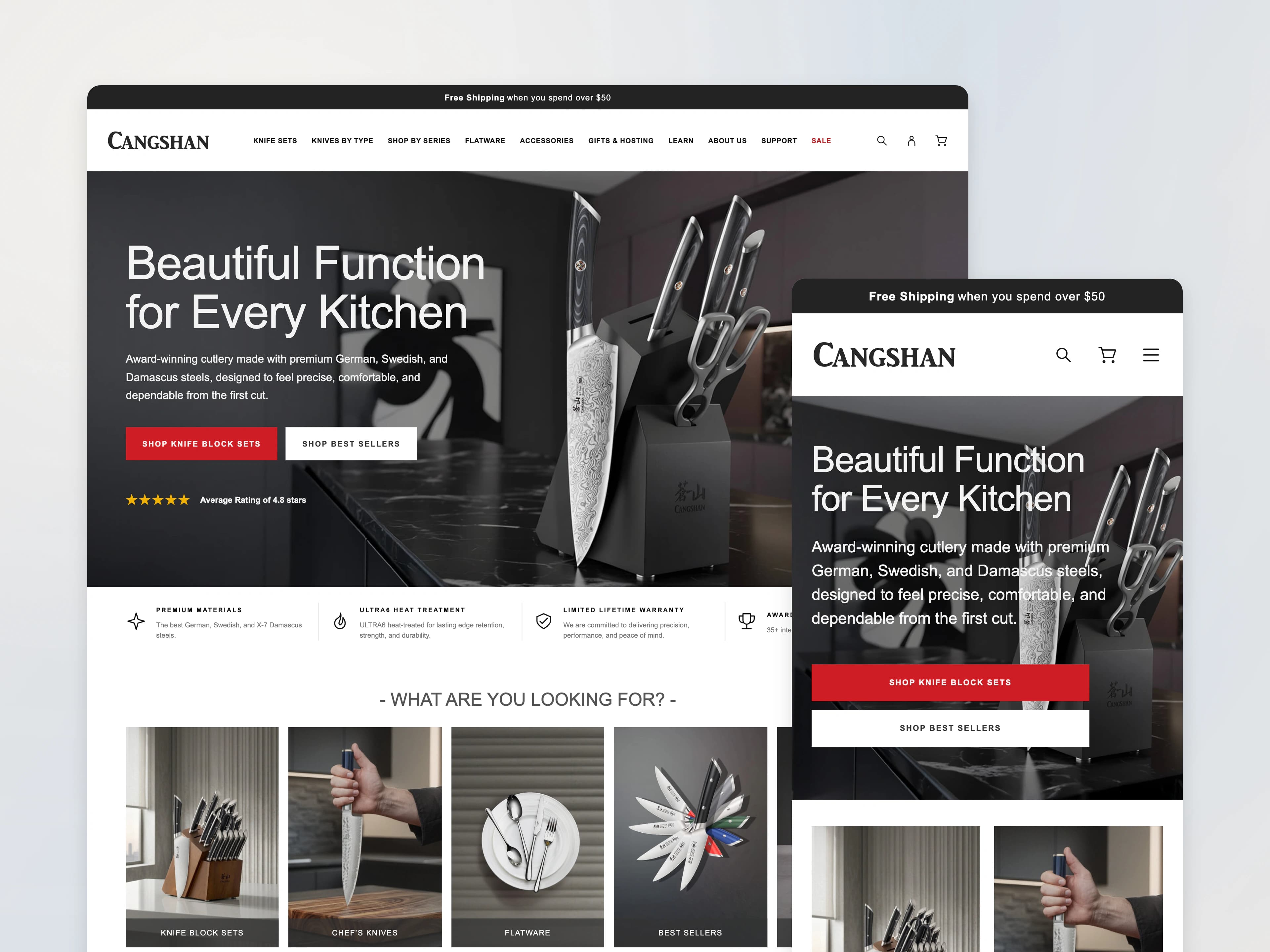
The honest limits. This is an early before-and-after window, not an A/B test. Traffic mix, discounts and tracking also changed, so it doesn’t prove the work caused the change. Not everything improved, and the case study says what didn’t.
How it runs - How a Shopify CRO engagement runs.
Fit call (20 minutes, free)
We talk through your traffic, what you’ve tried and what you suspect. If ongoing CRO isn’t the right next step, we’ll say so.
Starting point
If you’ve had a Shopify CRO Audit, its roadmap becomes the backlog. If not, the first sprint starts with a baseline and measurement check. The audit isn’t required.
Scoped proposal
You get a written scope and a fixed price for the first sprint before any work starts.
Build
Colin builds on a copy of your live theme. You provide collaborator access to Shopify, read access to analytics, and one person who can approve changes.
Launch and measure
We QA on mobile and desktop, publish when you approve, and check that tracking still records what it should.
Review and pick the next sprint
We report what moved and what didn’t, then pick the next priority from the data. Continue, pause or stop. No lock-in.
Pricing - Quoted after a call, fixed per sprint.
Quoted after a call
A fixed price for each scoped sprint.
We quote after the call because the work depends on your theme, apps, catalog size and what’s already been fixed. You see the scope and the price before any work starts.
Want a fixed-price starting point?
The Shopify CRO Audit is $2,899, delivered in 10 business days, 50% at booking and 50% on delivery.
Is this for you? - Who ongoing Shopify CRO is for.
A good fit if you
- Run an established Shopify or Shopify Plus brand with real traffic.
- Spend on acquisition, but conversion has stalled.
- Want changes measured, not just shipped.
- Have someone who can review and approve work each sprint.
Not a fit if you
- Are pre-launch or have very little traffic.
- Mainly want a visual restyle or a new theme.
- Need a guaranteed lift number before anyone has seen your data.
- Want someone to run your ads or email.
Questions - Straight answers about Shopify CRO.
Can you guarantee a conversion rate increase?
No. No honest partner can promise a number before seeing your data. We commit to a baseline, a ranked plan and an honest report on what each change did.
Who actually does the work?
Colin Stuckenschneider, Configurate’s founder, does the work himself. He is a Shopify engineer with 15 years of engineering experience, and he both diagnoses problems and builds the fixes.
Do we need a Shopify CRO Audit before ongoing CRO?
No, the audit isn’t required. If you’ve had one, its roadmap becomes the backlog. If not, the first sprint starts with a baseline and a measurement check.
Is this a monthly retainer?
No. We work in scoped sprints, each with a fixed price agreed before work starts. You can continue, pause or stop after any sprint.
What access do you need, and how do you handle our data?
We need collaborator access to Shopify and read access to your analytics. We use it only for the work, and no store or customer data goes into AI tools without your permission. You can remove access at any time.
How is a sprint priced?
Each sprint has a fixed price, agreed in writing before work starts. You don’t pay by the hour, and you can stop after any sprint.
Do we need Shopify Plus?
No. We work with standard Shopify and Shopify Plus. Plus opens more checkout options, such as Shopify Functions and checkout extensibility.
Can you work alongside our agency or in-house team?
Yes. We work alongside agencies and in-house developers. Changes are built on a copy of your theme and documented, so whoever maintains the store can pick them up.
Do you run A/B tests?
Only when your traffic and data support it. Otherwise we measure before and after against your baseline, and we say plainly what that comparison can and can’t show.
Next step - Convert more of the Shopify traffic you already have.
Start with a free 20-minute call. Tell us what’s happening with your store, and we’ll tell you what we’d look at first.
Prefer email? Write to colin@configurate.com.